A Semester GPA Calculator is an essential tool that helps students quickly determine their grade point average for a specific academic term. Whether you’re a high school student preparing for college applications or a college student tracking your academic progress, this calculator simplifies the process of converting your letter grades and credit hours into a precise GPA on the standard 4.0 scale.
This tool is designed for students who want to stay on top of their academic performance, make informed decisions about course selection, and understand exactly where they stand academically each semester. Instead of manually crunching numbers or waiting for official transcripts, you can calculate your semester GPA instantly and plan your academic strategy accordingly.
A semester GPA, also known as a semester grade point average, represents your academic performance during a single academic term. It’s calculated by taking the total grade points earned in all courses during that semester and dividing by the total credit hours attempted.
Unlike your cumulative GPA, which reflects your overall academic performance across all semesters, your semester GPA focuses specifically on one term’s worth of coursework. This makes it particularly useful for:
Understanding the difference between semester and cumulative GPA is crucial for academic planning. While your cumulative GPA carries more weight for graduation requirements and job applications, your semester GPA helps you track short-term academic goals and make immediate improvements.
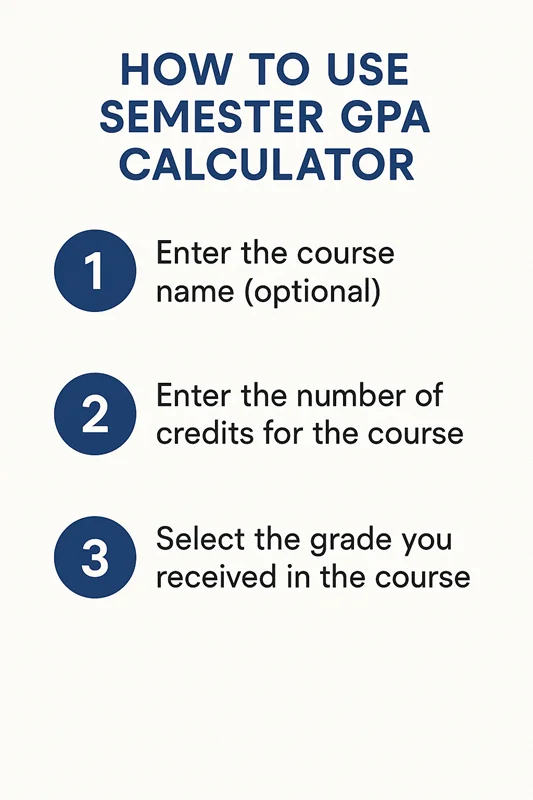
Using a college GPA calculator is straightforward, but following the correct steps ensures accurate results. Here’s how to calculate your semester GPA effectively:
Step 1: Gather your course information for the semester, including course names, final letter grades, and credit hours for each class.
Step 2: Enter each course into the calculator. Most tools allow you to add multiple courses, so don’t worry if you’re taking five, six, or more classes.
Step 3: Input the letter grade you received (or expect to receive) for each course. The calculator will automatically convert these to GPA points using the standard 4.0 scale.
Step 4: Enter the credit hours for each course. This is typically found on your course schedule or syllabus and usually ranges from 1-4 credit hours per course.
Step 5: Click calculate to see your semester GPA instantly.
The beauty of using a Semester GPA Calculator is that you can experiment with different scenarios. If you’re unsure about a final grade, you can test various possibilities to see how they would affect your overall semester performance.
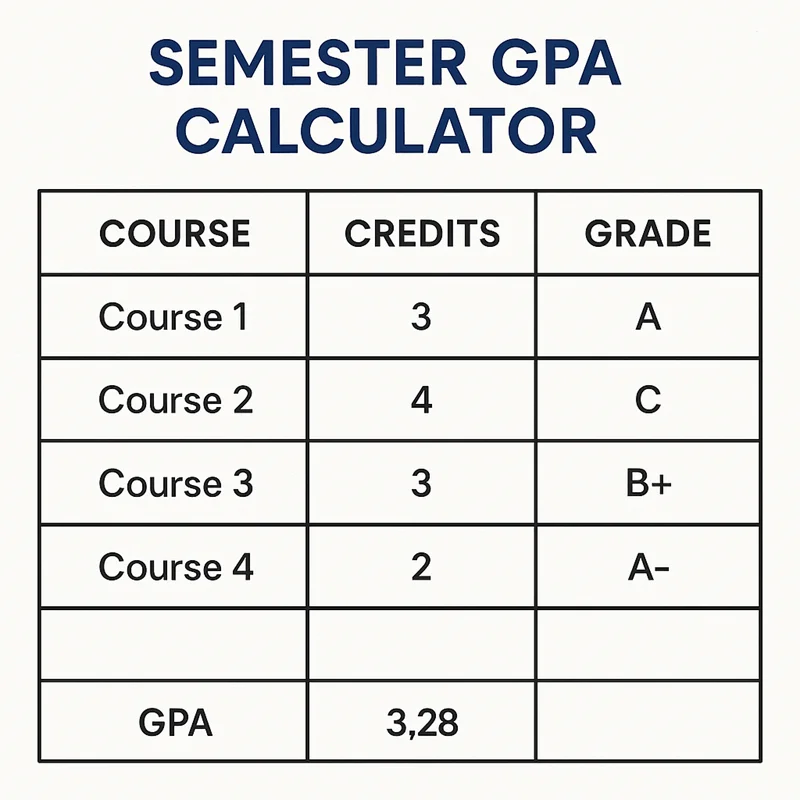
Understanding how letter grade to GPA conversion works is essential for accurate calculations. Here’s the standard conversion chart used by most institutions on the 4.0 GPA scale:
Letter Grade | GPA Points | Percentage Range |
A+ | 4.0 | 97-100% |
A | 4.0 | 93-96% |
A- | 3.7 | 90-92% |
B+ | 3.3 | 87-89% |
B | 3.0 | 83-86% |
B- | 2.7 | 80-82% |
C+ | 2.3 | 77-79% |
C | 2.0 | 73-76% |
C- | 1.7 | 70-72% |
D+ | 1.3 | 67-69% |
D | 1.0 | 63-66% |
D- | 0.7 | 60-62% |
F | 0.0 | Below 60% |
Note that some institutions may use slightly different scales, particularly for A+ grades, which might be worth 4.3 points at certain schools. Always check your institution’s specific grading policy for the most accurate calculations.
Let’s walk through a GPA example to see how the calculation works in practice. Imagine you’re taking four courses this semester:
Course 1: English Composition
Course 2: College Algebra
Course 3: Biology
Course 4: Art History
Total Grade Points: 9.9 + 14.8 + 12.0 + 8.0 = 44.7 Total Credit Hours: 3 + 4 + 4 + 2 = 13 Semester GPA: 44.7 ÷ 13 = 3.44
This example shows how to calculate semester GPA by multiplying each course’s GPA points by its credit hours, then dividing the total grade points by total credit hours.
Regularly calculating your semester GPA serves several important purposes in your academic journey. First, it helps you track academic progress throughout the semester rather than waiting for official grades to be posted. This proactive approach allows you to identify potential issues early and take corrective action.
Semester GPA calculations are also crucial for scholarship maintenance. Many scholarships require students to maintain a minimum GPA each semester, not just cumulatively. By monitoring your GPA with credit hours regularly, you can ensure you’re meeting these requirements.
Academic advisors often use semester GPA data to help students make informed decisions about course loads, major selection, and graduation timelines. Students with consistently high semester GPAs might be encouraged to take more challenging courses or consider honors programs, while those struggling might benefit from reduced course loads or additional academic support.
Additionally, some academic programs have semester-specific GPA requirements for continued enrollment. Graduate programs, competitive majors, and professional schools often evaluate semester performance as part of their ongoing assessment criteria.
A Semester GPA Calculator helps students calculate their Grade Point Average for a single semester based on course grades and credit hours. It provides accurate results instantly, making it easier to track academic performance and set future GPA goals.
| Letter Grade | Grade Point |
|---|---|
| A | 4.0 |
| A− | 3.7 |
| B+ | 3.3 |
| B | 3.0 |
| B− | 2.7 |
| C+ | 2.3 |
| C | 2.0 |
| D | 1.0 |
| F | 0.0 |
| Calculation | Formula |
|---|---|
| GPA Formula | Semester GPA = Total (Grade Points × Credit Hours) ÷ Total Credit Hours |
| Grade Points | Based on the grading scale used by your institution |
| Credit Hours | Total credits attempted during the semester |
A Semester GPA Calculator applies this formula automatically, helping students avoid manual calculations and obtain accurate GPA results.
| Course | Credit Hours | Grade | Grade Point | Credit × Grade Point |
|---|---|---|---|---|
| Mathematics | 4 | A | 4.0 | 16.0 |
| Physics | 3 | B+ | 3.3 | 9.9 |
| Chemistry | 3 | A− | 3.7 | 11.1 |
| English | 2 | B | 3.0 | 6.0 |
| Computer Science | 4 | A | 4.0 | 16.0 |
| Total | 16 | — | — | 59.0 |
Semester GPA = 59.0 ÷ 16 = 3.69
| Benefit | Description |
|---|---|
| Accurate Results | Calculates GPA using grades and credit hours. |
| Saves Time | Eliminates manual calculations. |
| Easy to Use | Enter your grades and credits for instant results. |
| Error-Free | Reduces calculation mistakes. |
| Academic Planning | Helps monitor semester performance and set GPA goals. |
| Situation | Purpose |
|---|---|
| After Semester Exams | Calculate your GPA as soon as results are available. |
| Scholarship Applications | Check if you meet GPA eligibility requirements. |
| Academic Progress | Track your performance throughout the semester. |
| College Transfers | Prepare academic records for transfer applications. |
| Graduation Planning | Monitor your GPA to meet graduation requirements. |
A Semester GPA Calculator is an essential tool for students who want to calculate their semester GPA accurately, monitor academic progress, and prepare for scholarships, internships, or higher education opportunities.
Improving your semester GPA requires strategic planning and consistent effort. Start by prioritizing courses with higher credit hours, as these have a greater impact on your overall GPA calculation. A strong performance in a 4-credit course affects your GPA more than the same performance in a 1-credit course.
Develop effective study habits early in the semester. Create a study schedule that allocates time based on course difficulty and credit hours. Utilize campus resources like tutoring centers, study groups, and professor office hours to strengthen your understanding of challenging material.
Consider your course load carefully. While it might be tempting to take many courses, a manageable schedule often leads to better grades than an overwhelming one. Quality over quantity is key when it comes to academic performance.
Stay organized with assignment due dates and exam schedules. Use a planner or digital calendar to track important dates, and start major projects well in advance. Procrastination is one of the biggest threats to maintaining a good semester GPA.
Finally, don’t hesitate to seek help when needed. Whether it’s academic support, stress management, or time management skills, your institution likely offers resources to help you succeed.
A Semester GPA Calculator is more than just a convenient tool—it’s an essential resource for academic success and planning. By regularly calculating and monitoring your semester GPA, you gain valuable insights into your academic performance and can make informed decisions about your educational journey.
Remember to bookmark this calculator and use it at the beginning, middle, and end of each semester. Regular monitoring helps you stay on track with your academic goals and provides the data you need for scholarship applications, program admissions, and career planning.
Take advantage of this tool to not just calculate your current GPA, but to explore different scenarios and set realistic goals for future semesters. Your academic success starts with understanding where you stand, and a Semester GPA Calculator provides that clarity in just a few clicks.

CGPA to Percentage is a free educational platform that helps students calculate CGPA, GPA, percentages, grades, credit hours, and other academic scores.
© 2026. All rights reserved.